

Banking FAQs
Mobile Deposit Holiday Information
Mobile Deposits made after 3PM CT the day before a holiday will not be processed until the next business day after the holiday.
General Credit Union FAQs
Membership at Red Crown is open to those who live, work, worship, volunteer, or attend school in the Tulsa, Creek, Mayes, Okmulgee, Osage, Pawnee, Rogers, and Wagoner counties of Oklahoma.
Updated Jan 2024
You can get a free copy of your credit report at annualcreditreport.com
Updated Jan 2024
Debit Card FAQs
REMINDER: Red Crown will NEVER contact you and ask for personal passwords or banking information. If someone contacts you claiming to be from Red Crown Credit Union and you suspect it may be a scam, DON’T share your personal information with the them. Hang up the phone and call us at 918.477.3200.
If fraudulent activity is suspected on your Red Crown debit card:
Red Crown uses an advanced fraud detection system to monitor your debit card for suspicious activity based on your card history and known fraud patterns. If potential fraud is detected, our Fraud Detection Services will attempt to contact you to verify the authenticity of the transaction.
How We May Contact You
If suspicious activity is detected on your Red Crown debit card, you may be contacted via email, text message, and/or an automated phone call. Here’s what to expect from each:
Email Alert
You’ll receive an email from our Fraud Detection Center with details about the potential fraud and instructions for next steps. You will only be asked to validate transactions — no other personal banking information will be requested.
Text Message Alert
You’ll receive a text message with details about the suspected transaction and the option to confirm or deny it. If you deny the transaction, a temporary block may be placed on your card and you’ll be directed to contact the Fraud Detection Center. Legitimate fraud alert texts will never include a link to click.
Automated Phone Call
You’ll receive an automated call from our Fraud Detection Center asking you to verify your identity and confirm whether recent transactions are legitimate. You will only be asked for basic identifying information — you will never be asked for your PIN or the security code on the back of your card. If fraud is confirmed, you may be connected with a live fraud analyst to review your account.
When in Doubt, Call Us
If you’re ever uncertain about a message or call you’ve received — or uncomfortable with the questions being asked — hang up and contact Red Crown directly. We’re always happy to help verify whether a contact was legitimate.
Red Crown will be notified of any action taken, and you may need to contact us to order a replacement card.
Help Us Keep Your Account Secure
- Keep your contact information current with Red Crown so we can reach you quickly if needed.
- Let us know in advance if you’ll be traveling or making unusual purchases — this helps prevent unnecessary flags on your account.
- Use CardHub in online banking or the mobile app to set alerts and manage your card controls.
- Set up account alerts in Red Crown online banking for added peace of mind.
To contact us regarding fraudulent activity:
During banking hours: 918.477.3200
24-hours a day: 800.472.3272
Updated June 2026
You can visit any Red Crown location or a Shared Branch.
Updated Jan 2024
General Browser Online Banking FAQs
Once on the website, click the Login button. You will then click “Enroll in online banking” and follow the steps.
Updated Jan 2024
Your User ID default is always your member account number. You can change your User ID in the Settings section of online banking. Currently, you can’t change your User ID on the mobile app.
Updated Jan 2024
Click Transfers, enter your transfer information, then click “make recurring” Follow the steps.
Updated Jan 2024
Click Transfers and choose which type of transfer you would like.
Updated Jan 2024
- Log in
- Click Settings
- Click the Profile drop down
- Choose which information you would like to change
Updated Jan 2024
- Log in
- Click the Transfers
- Click Pay A Member
- Enter their 13 digit account number to the account you want to transfer to
- Enter their last name
Note – You can only transfer money to PERSONAL deposit accounts (i.e. Savings and Checking)
Updated Jan 2024
Mobile App FAQs
Each mobile deposit is reviewed by a Red Crown employee. Once the check is accepted, it is summitted for deposit. Summitted deposits will hit the deposit account in the following batch of accepted deposits. Batch times start at 8:00AM CT – 8:00PM CT.
Updated Jan 2024
- Log in to mobile app
- Click More
- Click Change Password
Updated Jan 2024
Online Banking Alerts FAQs
Alerts can only be set up in the browser at this time, not in the mobile app.
These alerts are only sent once a day after 9AM CT.
These alerts only send limited information and doesn’t send a text/email for each transaction.
If you want individual Real-Time Debit Card Transactions, they can sign up on CardValet.
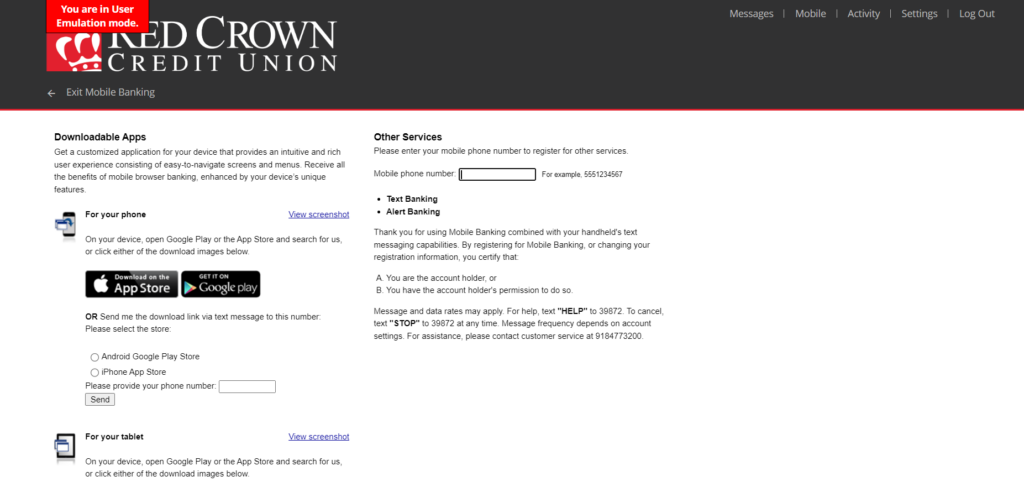
Step 1 – To set up mobile alerts you must first add your mobile number to the Mobile Page. Click on Mobile, accept the Terms. Then you will see this page.
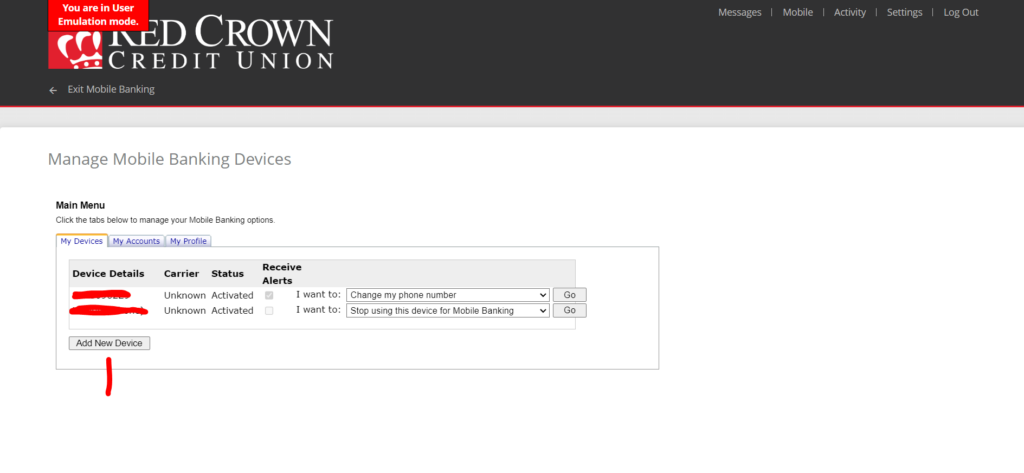
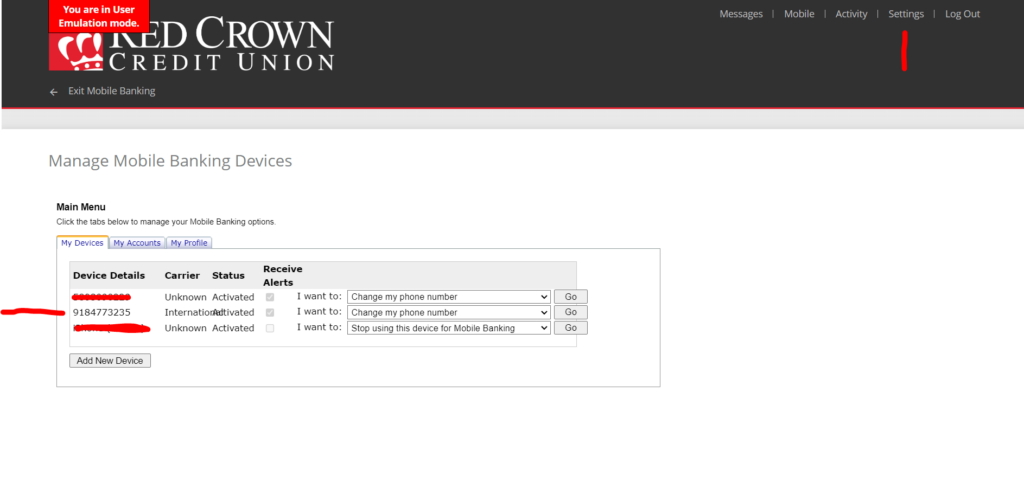
If you don’t see the page above, it is because the member has downloaded the mobile app or has entered a device here and they will see the page below. Click Add Device.
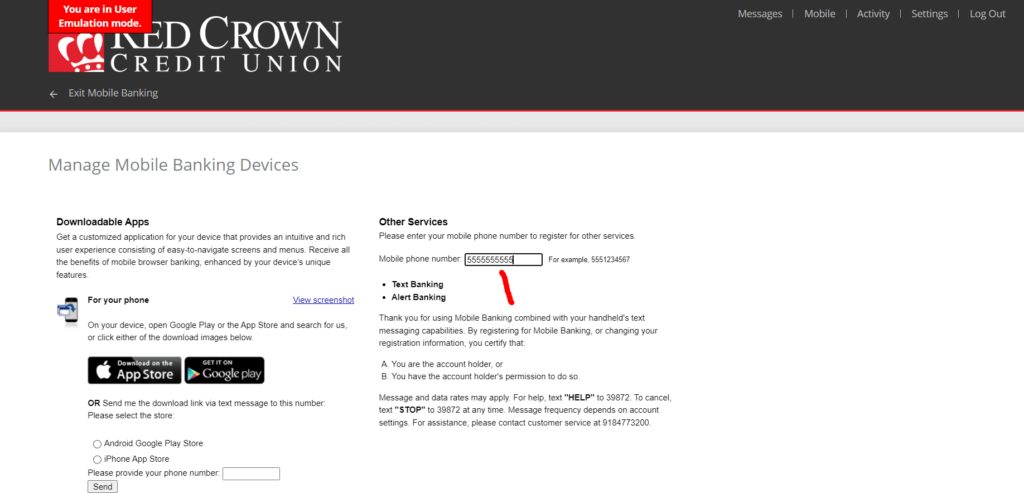
Step 2 – Enter your phone number in the box under Other Services on the top right of the page. Click Continue at the bottom of the page.
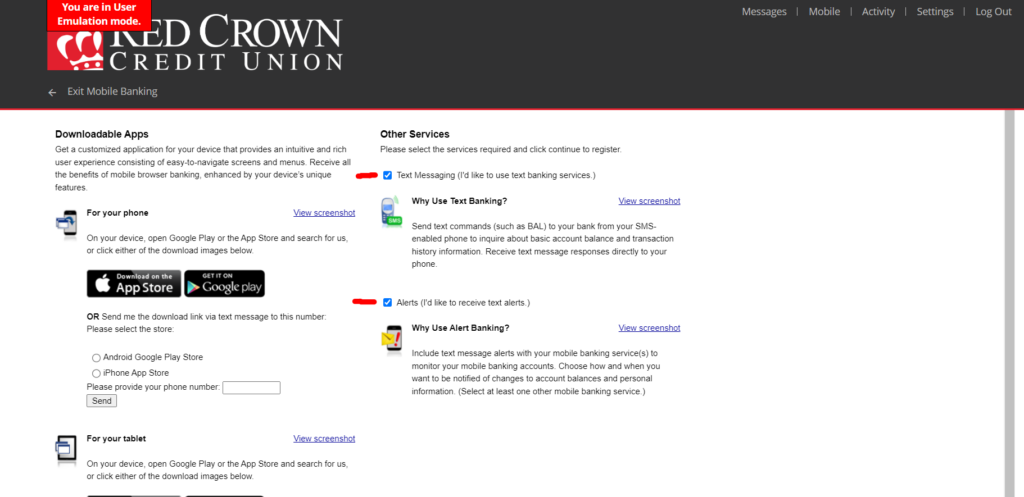
Step 3 – A new page will pop up, click the boxes for Text Messaging and Alerts, click Continue. You will receive a text message with a code. Enter the code into the webpage. Click Activate.
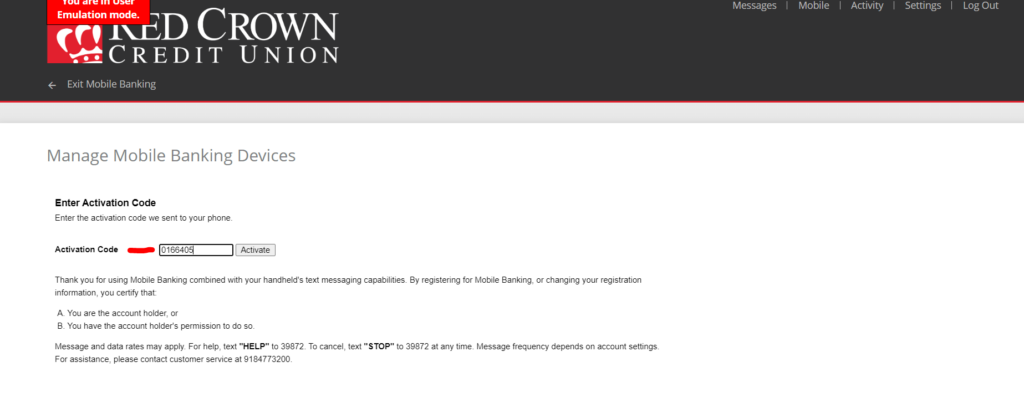
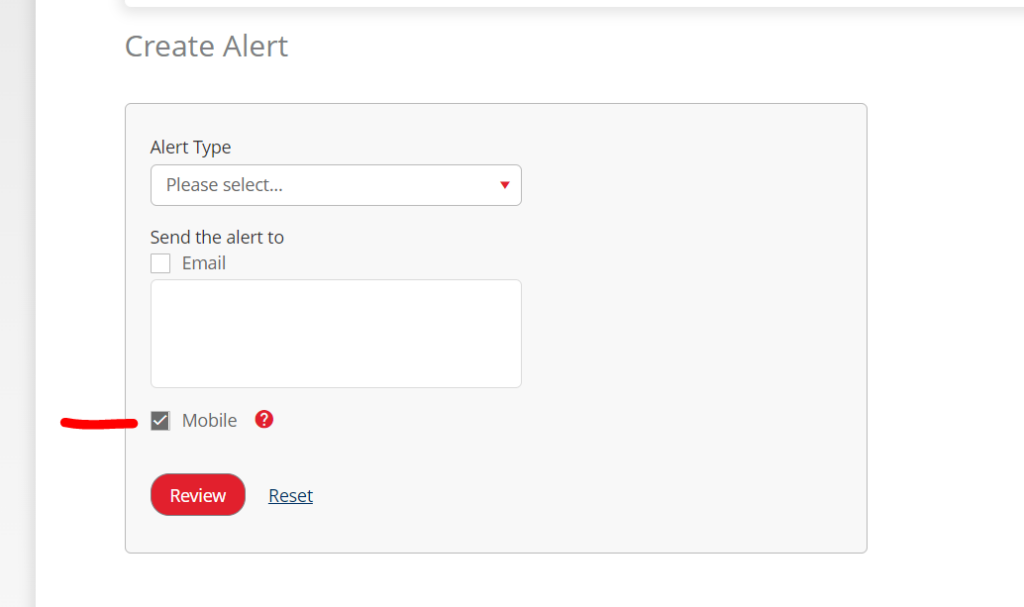
Step 4 – Once your phone number is on the page, you will need to go back to the Alerts page (In Settings) and set up your rules and you will be allowed to click the Mobile Alerts Box. These alerts will go to each phone number that is up in the Mobile page.
Updated Jan 2024
External Transfers FAQs
- Log in
- Click Transfers
- Click External Account Transfer
- Click Preferences
- Click Add Accounts
- Follow the instructions (Micro Deposits take 2-3 business days to deposit into your external account.)
Updated Jan 2024
Sending money from Red Crown to external account:
Standard Transfer – $1.50 per transfer
Next Day Transfer* – $3.00 per transfer
Sending money from external account to Red Crown:
No Fee
*Next Day Transfer will become available once you have collectively transferred $500 and you have used External Transfers for 90 days.
Updated Jan 2024
Limit 1 – $750 a day / $3,000 a month
Limit 2 – $1,500 a day / $3,000 a month*
Limit 3 – $2,500 a day / $5,000 a month*
*Must contact Red Crown to have limit raised from Limit 1.
Updated Jan 2024
Standard Transfers* – The transfer will appear in your account between 2 and 3 business days.
Next Day Transfers* – The next business day.
*Depends on if you submit the transfer before the end of day cut-off time.
Updated Jan 2024
Zelle FAQs
- Log in
- Click Send Money with Zelle
- Add connect Zelle with your cell phone or email
Updated Jan 2024
Transfers are free.
Stop Payment – $10.00
Updated Jan 2024
$1,000 a day / $3,000 every rolling 30 days.
Updated Jan 2024
Bill Pay FAQs
Bill Pay is a secure online service offered to our members to make paying your bill easier and faster to anyone in the United States from your Red Crown checking account.
You can set up Bill Pay as a one-time payment, or as a recurring payment. Bill Pay will save you money by no longer needing to order checks and buy stamps.
Updated Jan 2024
- You must have a checking account to use Bill Pay.
- Login
- Accept Disclosures
Updated Jan 2024
There is no fee for sending Standard Payments.
Rush Delivery Fee (Electronic) – $9.95
Stop Payment – $10.00
Updated Jan 2025
Electronic Payments are verified Payees that have an electronic payment connection with our Bill Payment provider. Money will be withdrawn from your account and be deposited into the Payees account, usually within two business days.
Certified Check Payments are managed Payees that don’t have an electronic payment connection with our Bill Payment provider. Money will be withdrawn from your account once the check is sent and will arrive at the payee within five to seven business days.
Standard Check Payments are unknown Payees with our Bill Payment provider. This is usually as small company or an individual. The check will be sent and will arrive at the payee within five to seven business days. Money will be withdrawn from your account once the Payee deposits the check.
Updated Jan 2024
Standard Check – You can call the Bill Payment Support Number at 866-960-1908 and have them put a Stop Payment on your check or you get the check number from the Bill Payment Recent Payments area and then put a Stop Payment on that check in you Checking Accounts page in Online Banking. You will then need to submit another payment to your payee.
Certified Check – You can call the Bill Payment Support Number at 866-960-1908 and have them put a Stop Payment on your check and have them return the funds back to your checking account. You will then need to submit another payment to your payee.
Updated Jan 2024
Statements FAQs
Our accounts are now combined under one primary member number instead of separate member numbers. If you have joints on certain accounts and not on other accounts, statements will come separately for financial privacy reasons.
Here are examples of statement roles:
- Primary Member with no joint owners on any account. All accounts will be on a combined statement on a monthly basis.
- Primary Member with same joint(s) on all accounts. All accounts will be on a combined statement on a monthly basis.
- Primary Member with joints(s) on at least one account, but not all accounts. Below is a breakdown of accounts and their delivery schedule:
Membership Savings – Quarterly unless there is a checking or loan attached with transactions.
Checking – Monthly
Loans – 15 days before loan is due
Sub Savings – Quarterly
CDs – Quarterly
IRAs – Quarterly
Updated Jan 2024
You will either need to have the same joint(s) on all accounts or have no joint(s) on all accounts.
Updated Jan 2024
You now control your E-Statements and if you want E-Statements, follow these steps:
- Login to Online Banking
- Click E-Statements
- Read Disclosures
- Click eSign document
- Open downloaded PDF
- Enter code on from downloaded PDF into eSign Conformation Code box
- Click I Agree
- Choose the options you want to set up your E-Statements
If you are having issues setting up E-Statement, please contact Red Crown and we will assist you.
Updated Jan 2024
Credit Card FAQs
New Password Requirements:
Minimum of 12 characters
Must Include:
– One uppercase letter
– One lowercase letter
– One number
– One special character (!@#$%^&*()_+}{“:;’?/><.,)
– Must be different from last 10 passwords
– Cannot contain your Login Name (in any order)
Updated Jan 2025
You now can, once you log into online banking, click on your personal Mastercard under Loans and Credit Cards. This will take you to your eZCard portal with your credit card details. Or you can visit www.ezcardinfo.com directly.
Updated Jan 2024
When a member makes a payment, regardless of how it is made, it will take three days for the payment to be released.
Example 1:
Mary Member makes a payment after 1:30 PM at a Red Crown location. This payment will not be submitted until Monday. The hold will start on Monday when the payment arrives at the credit card processor, even though the payment will show a posting date of the day it was made at the branch. She can use her funds on Thursday, which is the day after the 3rd business day.
Example 2:
Mark Member makes a payment Tuesday at 10:00 AM on the www.ezcardinfo.com website. This payment will post overnight to his credit card. The three days will start on Wednesday, and he will be able to use his card on Saturday, the day after the 3rd business day.
Updated Jan 2024
This is a revolving line of credit, and it is billed monthly. Once the statement closes on the 24th day of the month, then the due date will advance to the next month.
Updated Jan 2024
Renewal cards are mailed in the middle of the month that they expire. The existing cards are valid until the last day of the month.
Updated Jan 2024
Payments are due on the 21st of each month.
Updated Jan 2024
Yes, you can set up an automatic payment. You may request this in person at any of our branches, through our secure messaging system in online banking, or online at www.ezcardinfo.com.
Updated Jan 2024
You can make payments by bringing it in or mailing in payment to any of our branches, by transferring funds through online banking, or by going to www.ezcardinfo.com.
Updated Jan 2024
Yes, there is a 10-day grace period.
Updated Jan 2024
You may contact us by secure message through online banking, calling any of our branches, visiting us in person or noting it through www.ezcardinfo.com.
Updated Jan 2024
Statements close on the 24th of each month and will be mailed one to two business days afterward. You should receive your statement around the 1st of the following month.
Updated Jan 2024
You can sign up for E-Statements on www.ezcardinfo.com.
Updated Jan 2024
No, we do not charge a fee to use our Mastercard.
Updated Jan 2024
No, we do not pass these fees to our Red Crown Mastercard members.
Updated Jan 2024
No, we do not charge a fee to transfer balances to your Red Crown Mastercard.
Updated Jan 2024
In person at any of our branches, through your online banking secure message service, or by submitting your request on the Red Crown website.
Updated Jan 2024
At this time, we are not offering a rewards program.
Updated Jan 2024
Yes, with a qualified co-signing parent or guardian.
Updated Jan 2024